Partner workshop

Your account. ChatGPT. Founders. Product update.

Tuesday 24 November 2026 · 2:00 PM UK
Last week · 17 November

Missed last week? Highlights workshop video.
17:27
  • 0:12Email deliverability
  • 4:19Pricing
  • 8:27Google's November update
  • 10:13Report a fault from your assistant
  • 11:13The portal redesign
  • 11:58Connected apps
  • 13:07What we are working on next
  • 14:33Member feeds and member privacy
Today

Agenda

1Account change emails
2ChatGPT connector
3Partner feedback
4Founders
5Product update
6Open discussion
Your account · new

Portal account changes are emailed to the account owner.

Live now · three new emails
HubPeople.aito you
Your HubPeople password was changed
The password for your HubPeople login was changed on 24 November 2026 at 11:03 UTC.
Sign-in
HubPeople.aito you
Your HubPeople payout details were changed
The bank details your HubPeople payouts are paid to were changed. The new details are never in the email.
Payouts
HubPeople.aito you
A Google account was linked to your login
The first time a Google account is linked to your HubPeople login, we tell you when it happened.
Sign-in
Keep an eye out for them. If a change wasn’t you, reset your password and get in touch.
More to comeMore ways to keep your account safely in your hands.
Your assistant · new · works on a free ChatGPT account

ChatGPT can now connect to your brands.
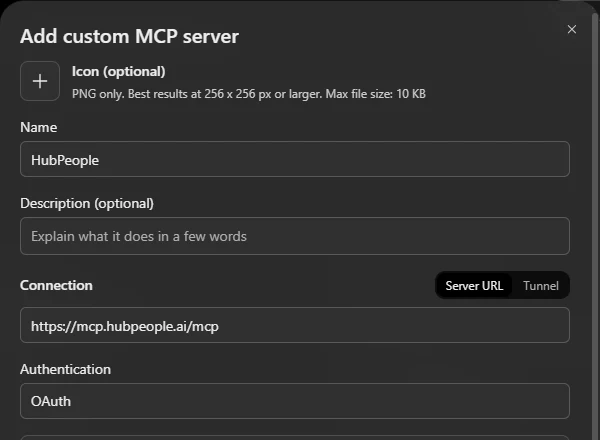
ChatGPT's Add custom MCP server box, with the HubPeople address filled in
1Add HubPeopleOn chatgpt.com: Plugins, then Add custom MCP server. The same address as in Claude.
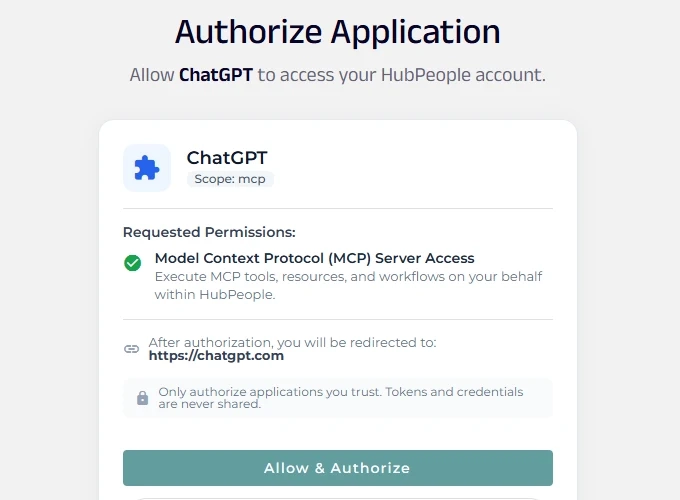
HubPeople asking to allow ChatGPT to access your account
2Sign in and allowYour HubPeople login, then Allow & Authorize.
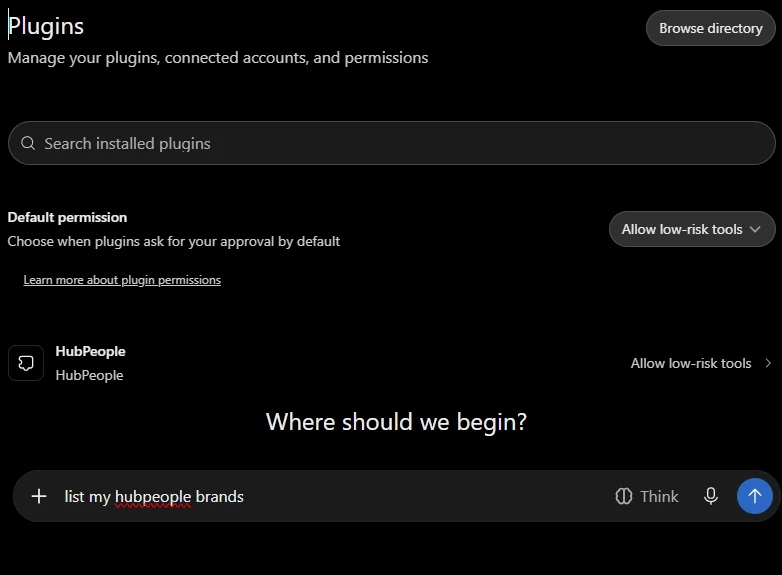
HubPeople listed under ChatGPT's plugins, and a prompt asking for your brands
3AskWe asked for our brands and they came straight back.
Your feedback · since last week

What you told us, and where it is.

Partner feedback18from your assistant, the form and email
Issues86 dealt with · 2 in progress
Questions54 answered · 1 in progress
Improvements32 dealt with · 1 in progress
Worth sharing with everyone
Issue · fixedThe short login address on your members domainThe login page on your own members domain now opens as your brand, without the long ID on the end of the address.
Question · answeredPrices on a site you host yourselfAsk your assistant for your prices: it gets today’s figure for every plan and currency.
Your feedback · fixed and live

The short login address now works.

The link from your site, as beforeapp.curvaliciousdating.com/s/login/2be21adc-ca91-49e0-93a4-afce0e0059f7?pn=ai~canvas-studio~…
Now this works tooapp.curvaliciousdating.com/s/login

The long ID told the login page which brand it was. On your own members domain it now works that out from the address, so the page opens as your brand either way.

Why it matters: an address you can type, print or hand to someone. Your site’s own Login links stay as they are.
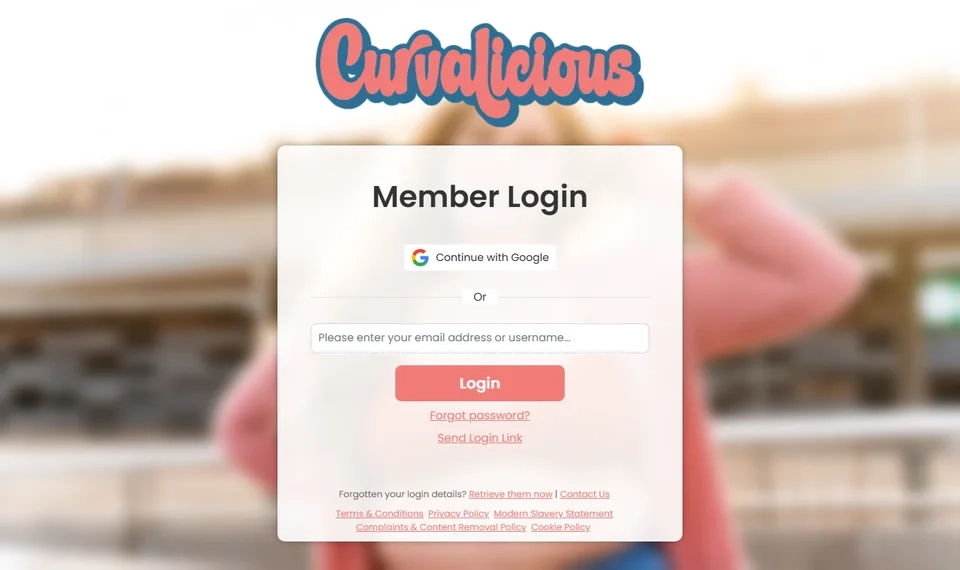
The short login address opening as the brand's own login page
The short address, opened today
Your feedback · answered

Prices on a site you host yourself.

Ask your assistant: “What are my VIP prices in pounds?”
PlanPlaceholderToday
1 month, charged£29.96£29.96
1 month, per week£6.99£6.99
3 months, charged£64.16£64.16
3 months, per week£4.99£4.99

On a HubPeople page you write the placeholder, and we fill in the price every time the page is built. It stays right by itself.

On a site you host yourself a placeholder cannot fill itself in, so you use today’s figure.

Refresh it yourself, every few weeks.Prices can change. Ask your assistant again and update the page, so what you show matches what members are charged.
04

Founders

Barry & Mayka
Founders · where we want to get to

From becoming a founder to content on your landing pages.

Become a founder
Run your community
Use it
01
Your founder account, set up for you

Your assistant asks what a sign-up would, then creates the account. You are set as the founder.

EmailNameProfilePhoto
02
Post polls and articles

Written with your assistant and posted to your members area.

PollsArticles
03
Members join in

They vote and comment in your members area.

VotesComments
04
It all comes back to you

Your assistant reads how each poll is going and what members are saying.

Poll progressComments
05
Onto your landing pages

Use it with the other HubPeople tools to build page content from your own community.

Landing pages
and round again: what members say shapes what you post next
All of it from your assistant, through the same HubPeople connection you already use for your pages.
Still working this outSnippets, as with member profiles and pricing, so a page refreshes itself when a poll moves or a new comment lands.
Founders · after that

What comes after.

Welcome messageDraft your welcome message for your own community.
Community badgesReward your community behaviours through badges.
05

Product update

Martyn
Product · November 2026

Summary

01Recently releasedDark mode and themes
02In developmentLight or dark as the default for each brand
03Coming nextSpaces redesign, Verified badge for liveness checks, Black Friday offer
01 · Recently released

Dark mode and themes are live.

>5,000members have used it so far
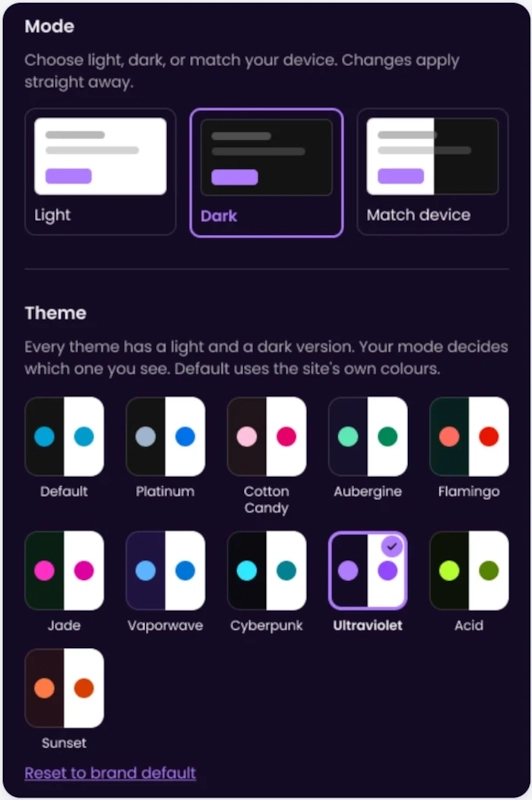
  • Modes. Light, Dark or Match Device, which follows the member’s device setting.
  • 10 themes. Each has a light and a dark version.
  • Default. Uses the colours you set for the brand, until a member picks a theme.
  • Free. Available to every member on every brand.
  • Where. Navigation and new settings section.
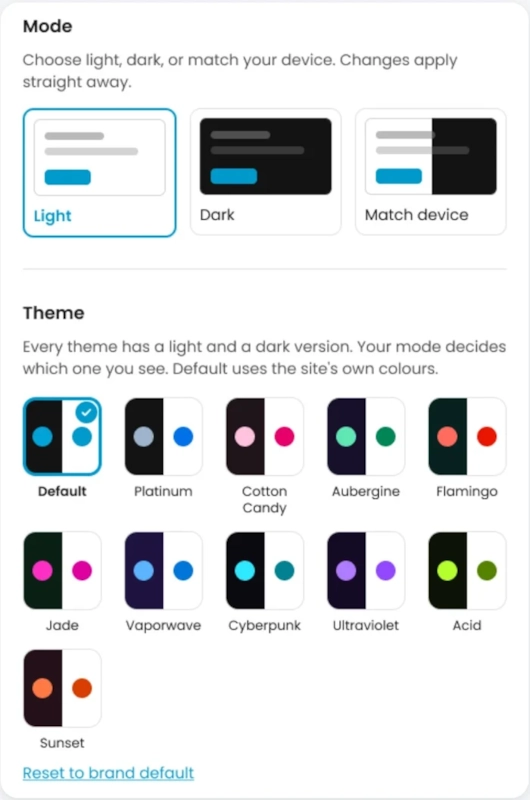
Mode and theme settings in light mode, Default theme
Light mode, Default theme
Mode and theme settings in dark mode, Ultraviolet theme
Dark mode, Ultraviolet theme
02 · In development

Light or dark as the brand default.

  • Set per brand. A new Dark or Light Mode setting on the brand’s App tab in the portal.
  • New members. Sets the mode new members see first. Brands stay on light until you change it.
  • Your colours. Uses the App colours you already set, in light or dark. Themes cannot be set as the default yet.
  • Member choice. Members can still switch mode or pick a theme.
  • After that. The sign-up flow follows the brand’s mode, with a dark background and light header text.
Portal, brand App tab (mock-up)
Dark or Light ModeSet whether new users see the app in light or dark mode
03 · Coming next

Planned for this week.

On test

Spaces redesign

  • Feeds become forum-style lists, with more posts on each screen
  • Posts with the most recent comments sit at the top
  • Members switch space from a strip at the top of every feed
  • The Spaces homepage is removed, so members land directly in a feed
On test

Verified badge for liveness checks

  • Members who pass a liveness check get the Verified badge
  • The same badge as ID and admin verified members
In set-up

Black Friday offer

  • Discounted 1 month VIP+
  • Super Matches and Boosts included
  • Based on last year’s offer, with Boosts added
← Back to the workshop Partner workshop  ·  24 November 2026
01 / 17