
Deep dive: Revenue levels
Published Updated
The campaign report has three Revenue level buttons: All, Join and Restricted Join. The same week can show three different payouts, and each one tells you something different. Knowing the difference lets you read your figures properly and act on them: see what you earned, what your new sign-ups are worth, and which traffic is paying off.
The three levels
Registrations, Impressions and Tracking Link Clicks are the same whichever level you pick. The level only changes the money: which members' payments are counted, and up to what date.
Everything you earned in the dates.
Every payment made in the dates, from any member, including members who joined months ago.
What your new sign-ups paid in the dates.
Only members who registered in the dates, and only what they paid in those dates.
What your new sign-ups have paid since.
Only members who registered in the dates, and everything they have paid up to today.
Changes every day, and can fall.
What counts as a payment
Payout is your share of every kind of payment a member makes:
- Initials: a member's first payment.
- Re-initials: further purchases on top of the first, such as Supermatches, Boosts and VIP+ add-ons, and former VIP members upgrading again after cancelling.
- Rebills: their subscription renewing.
Refunds and chargebacks are taken off. On Join, that includes a refund or chargeback made after the dates, which is why a Join figure can go down.
Initial Count can differ between levels. Say someone registered in August and made their first payment this week. On All, that payment counts this week. On Join and Restricted Join it does not, because they did not register this week.
In a picture
Three members and one week. Member A joined in July and pays again during the week. Members B and C join during the week; C pays again afterwards.
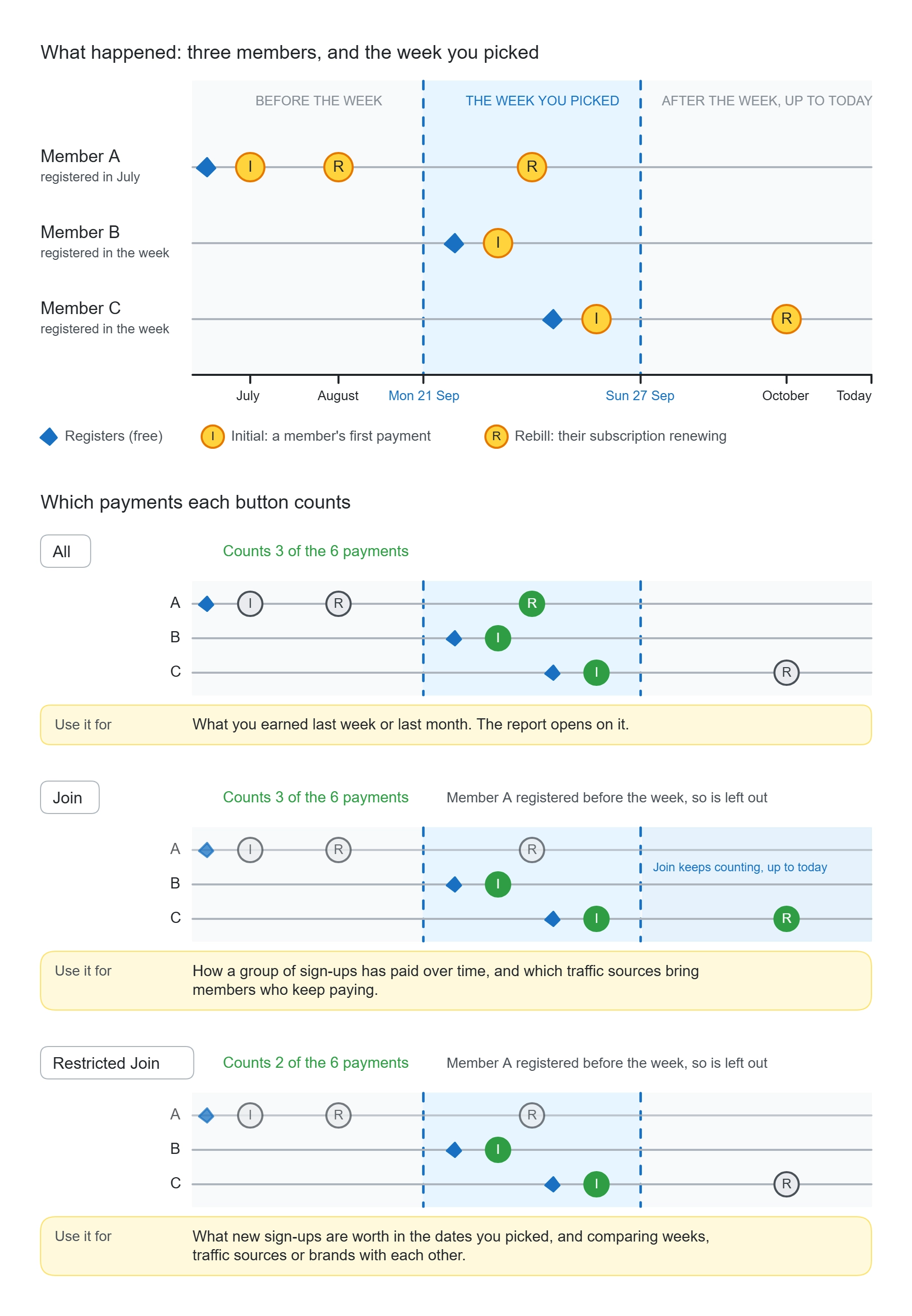
- All counts A's payment in the week, and B's and C's first payments. Not C's later payment: it falls after the week.
- Join leaves A out (A joined before the week), and counts everything B and C have paid up to today, including C's later payment.
- Restricted Join also leaves A out, and counts only what B and C paid inside the week.
Which one to use
| If you want to know | Use |
|---|---|
| What I earned last week, or last month | All |
| What a new sign-up is worth, or Payout per user | Restricted Join |
| Whether this week was better than last week | Restricted Join (or All) |
| Which traffic sources or brands bring in paying members, compared fairly across any dates | Restricted Join |
| Which traffic sources bring members who keep paying | Join, comparing sources over the same dates |
| How a group of sign-ups has paid over time | Join |
Join only compares fairly when everything is over the same dates and read at the same time. An older group of sign-ups has simply had longer to pay, so never compare two different periods on Join.
Why the numbers differ
An example, for illustration only. These figures come from a demo account, not a real brand. Your own figures will be different.
One week (12 to 18 October), four payouts:
| Level | Payout | What it is |
|---|---|---|
| All | £2,402.78 | Everything earned that week, from new and old members |
| Restricted Join | £955.03 | What that week's new sign-ups paid that week |
| Join, read on 25 October | £1,037.25 | What they had paid a week later |
| Join, read on 25 November | £1,387.27 | What they had paid a month later |
All is usually the biggest, because it includes members who joined before the week and are still paying. Restricted Join is the smallest, because it counts only the newest members, and only for that week. Join starts at Restricted Join and keeps moving: the same week reads differently each time you look.
Which level your assistant uses
Your assistant picks a level from the way you ask:
| If you ask | It uses |
|---|---|
| "What did I earn last week?" | All |
| "What's a new sign-up worth this month?" | Restricted Join |
| "How have September's sign-ups paid since?" | Join |
If your question could mean more than one, it uses All, the level the report opens on, and offers you the other two.
It always tells you which level a figure is on. A Join figure also comes with the time it was counted to, because it changes.
Check, or ask it to explain
You are always in charge of the level. If you want to be sure, or a figure surprises you, ask:
"Which revenue level is that on?"
"Show me last week on all three levels side by side."
"Why is Join higher than Restricted Join for that week?"
"Which level should I use to compare my traffic sources?"
Or name the level yourself, and it will use that one:
"How have the people who joined in September paid since? Use Join."