
Deep dive: Redirect Rules
Published Updated
The full mechanics behind Redirect Rules: exactly how a request is resolved, the matching semantics of each rule type, how priority and conflicts play out, what the platform normalises for you, and how to test a rule properly. Read the Redirect Rules guide first if you have not created a rule before.
How a request is resolved
When a visitor requests an address on your linked domain, the platform works through this order:
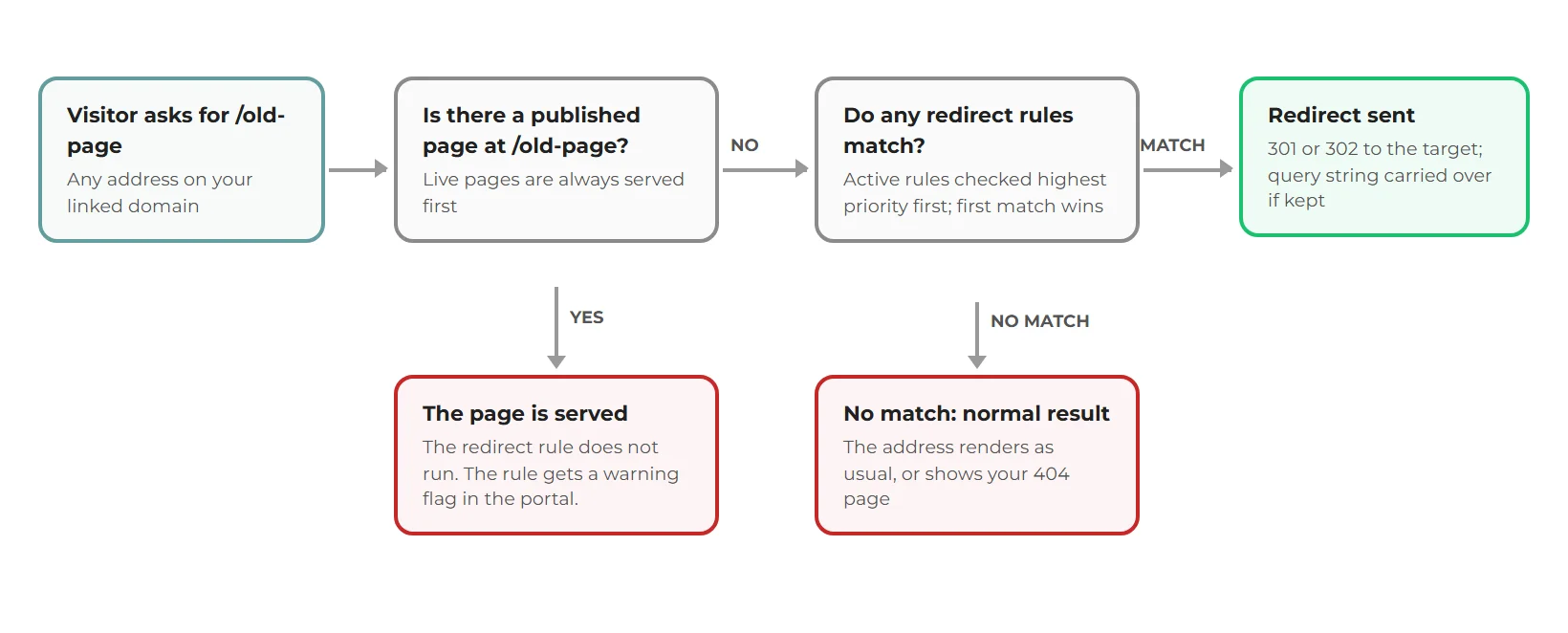
- Published page first. If a published page exists at the requested path, it is served. Redirect rules are never consulted. This is by design: a redirect cannot take down a live page.
- Then redirect rules. With no page at the path, your brand's active rules are checked from the highest priority downwards. The first rule that matches wins and the visitor is sent a 301 or 302 with the new location.
- Then the normal result. No page and no matching rule means the address resolves the way it always did, usually your 404 page.
Rules belong to the brand and are looked up by the domain the request arrives on, so they apply across the brand's linked domain. They also work on a brand's temporary address before a domain is linked: on an address like join-affinity.com/<brand-code>/cycling, the brand code identifies the brand, rules match against the part after it (/cycling), and redirect targets keep the brand code prefix automatically. Only normal page requests are considered: requests with a file extension (.html, .jpg, .pdf, .xml and so on) and non-GET requests are never redirected by rules.
What the platform normalises for you
| You save | What is stored / matched |
|---|---|
A source or target without a leading slash, e.g. old-offers | A leading slash is added: /old-offers |
A source with a trailing slash, e.g. /old-offers/ | The trailing slash is stripped; visitors reaching either form are matched (the platform already sends trailing-slash addresses to the version without) |
| Any status code other than 302 | Stored as 301. Only 301 and 302 exist here |
| An invalid regular expression as a Regex source | Rejected at save time; it never reaches your live site |
| A Direct source equal to its target | Rejected: it would loop on itself |
An internal target containing // | Rejected as malformed |
/old-offers does not match a request for /Old-Offers. Create rules in the exact case your old links used (lowercase for almost every site). Direct rules, precisely
A Direct rule is an exact path-to-destination mapping. The request path (ignoring any query string) must equal the source exactly. No pattern characters have any meaning: a * is not allowed in a Direct source, and a $1 in a Direct target is meaningless and gets flagged as an issue.
Two loop protections apply: you cannot save a Direct rule whose source equals its target, and at serve time a Direct rule whose target equals the address just requested is skipped rather than looping.
Wildcard rules, precisely
A Wildcard source is a path with one or more * characters, and it must contain at least one. The whole path has to match, not just the start:
*matches any run of characters, including slashes and the empty string.- Each
*is a capture: the first*is$1, the second$2, and so on. Use them in the target to rebuild the address, e.g./blog-2019/*to/blog/$1. - A target without any
$tokens sends every matching address to that one destination, e.g./blog-2019/*to/blog. The portal reminds you of this with an advisory warning. - Cloudflare-style patterns that include a host (e.g.
www.example.com/archive/*) are accepted for compatibility, but only the path part takes part in matching; which site the rule applies to is decided by the brand the rule belongs to.
/archive/* matches /archive/2019 and /archive/2019/june, but not /archive itself (there is nothing after the slash for the * to stand in for, and the empty match still needs the slash present). Add a separate Direct rule for the bare folder address. Regex rules, precisely
Regex sources are full regular expressions, validated when you save. At serve time they are evaluated with JavaScript regex semantics against the request path.
- Anchor your pattern. Patterns are not anchored for you:
/blogas a regex matches every address containing/bloganywhere. Write^/blog$or^/blog/(.*)$to say what you mean. - Capture groups come out as
$1,$2... in the target:^/products/(\d+)$to/shop/$1. - The target is a plain path, not a regex. Write
/shop/$1, never^/shop/$1: a^in a target is treated as a literal character and ends up in the redirect address. - Convenience tokens: a
{name}segment in a regex source is shorthand for([^/]+), a capture that matches one path segment./blog/{slug}is equivalent to/blog/([^/]+)and the captured segment is available as$1.
Priority, ordering and conflicts
Active rules are evaluated from the highest priority number downwards; among equal priorities, the most recently created rule is checked first. The first match wins and evaluation stops. The portal's issue checker warns you about the common traps:
| Warning | What triggered it |
|---|---|
| Matching page found; page serving takes priority | The rule's source is (or overlaps) a live page path, so those requests serve the page, not the redirect |
| Rules share the same source pattern | Two or more active rules of the same type have the same source; priority decides, and equal priorities are ambiguous |
| A higher-priority wildcard can match this source | A broad wildcard sits above a specific Direct rule and may swallow its traffic |
| Broad wildcard may shadow N lower rules | A catch-all pattern such as /* outranks more specific rules beneath it |
| Target does not match an existing page | A Direct rule's internal target is not a live page, so visitors will land on your 404 |
| Target shares the source's prefix | A wildcard whose target sits inside the folder it matches can redirect to itself in a loop |
| Replacement tokens never resolved | $1-style tokens in a Direct rule, or more tokens than the pattern has captures |
Warnings are advisory: the rule still saves, and the platform re-checks the whole rule set every time you open the tab or change a rule.
Query strings and status codes
- With Preserve query string on (the default), the visitor's query is appended to the target:
/summer-offer?src=emailbecomes/pricing?src=email. If the target already carries its own query string, the visitor's is dropped rather than merged. - Matching itself ignores the query string:
/summer-offer?anythingstill matches a source of/summer-offer. - Only 301 (permanent, cached hard by browsers and transferred by search engines) and 302 (temporary) are available. Remember that browsers cache 301s aggressively: while experimenting, prefer 302 and switch to 301 when you are sure.
Pages vs redirects, in detail
Because published pages are served from the platform's page cache before rules run, a rule whose source is a live page is dormant, not broken. The practical sequence for retiring a page into a redirect:
- Create the rule first. It will carry the page-priority warning; that is expected.
- Delete (or move) the page in the Pages tab.
- Allow a couple of minutes: the page's cached copy has to drop out as well as the rule cache picking the rule up.
- Test the old address (see below) and confirm the redirect answers.
Testing a rule like an engineer
Rules reach your live site within about 60 seconds of saving (each site keeps a short-lived copy of its rule set). Then check the actual response headers rather than trusting the browser, which caches redirects:
curl -sI "https://www.yourbrand.com/summer-offer?src=email"

HTTP/2 301
location: /pricing?src=email
What to look for: the status you chose (301 or 302) and a location header pointing at the target, with the query string carried over if you kept it. A 200 instead of a redirect usually means a live page still holds the address, or the rule cache has not refreshed yet. In a browser, always test in a private window: a remembered 301 from an earlier experiment will otherwise mask your changes.
Testing before your domain is linked: the same check works on the brand's temporary address. The location header keeps the brand code, for example:
curl -sI "https://join-affinity.com/<brand-code>/cycling"

HTTP/1.1 301 Moved Permanently
location: /<brand-code>/london
Limits and edge cases
- Page addresses only. Anything with a file extension is served as a file and skipped by rules, including old
.htmladdresses. The platform already maps/page.htmstyle requests onto the matching page where one exists. - GET only. Form posts and API calls are never redirected.
- Lengths. Sources up to 512 characters in the portal form; targets up to 1024.
- External targets (full
https://addresses) are checked against your account's allowed-link permissions at save time. - Complexity guard. Pathologically expensive regex patterns are timed out by the issue checker and flagged rather than left to slow your site.
Portal rules or Cloudflare rules?
Many partners' domains run through their own Cloudflare account with the proxy enabled: that is the advised setup in the Cloudflare DNS and SSL guide, and it even applies a Cloudflare redirect template (www to root) as part of it. If that is your setup, Cloudflare's own redirect rules are available to you too, and for pure speed the edge wins: a Cloudflare rule is answered by a server near the visitor before the request ever reaches the platform, and it keeps working even when the origin is having a bad day. Cloudflare's bulk redirect tooling also suits very large legacy rule sets.
The trade-offs matter though. Cloudflare rules live outside the portal, so the platform cannot check them against your pages or warn you about clashes. And the precedence flips: a portal rule can never take down a live page (pages are always served first), but an edge rule fires before the platform serves anything, so it absolutely can put a live page out of reach without any warning.
| Portal redirect rules | Cloudflare rules (your own account) | |
|---|---|---|
| Speed | Evaluated at the platform | Answered near the visitor, fastest |
| Safety | Live pages always win; clashes are flagged | Beats everything, including live pages; no clash checks |
| Management | In the portal, next to your pages | In your CDN account, separate from your site |
| Best for | Day-to-day redirects tied to page changes | Very large migration maps and domain-level rules |
A sensible split: use portal rules as the default, especially for anything tied to page renames and retirements, and consider Cloudflare when you are carrying a very large legacy map or the rule is about the domain rather than the site (like the www-to-root rule from setup). Whichever you choose, keep one source of truth per address: the same path redirected in both places is a recipe for confusing behaviour when one side changes.