
Sitemaps: how your site tells search engines what exists
Published Updated
Your sitemap is the list of pages you hand to search engines so nothing gets missed. On HubPeople there is one step you must do yourself: create the sitemap, once. From then on the platform keeps it up to date for you every time your pages change. This guide shows where that create step lives in the portal, what the buttons do, and how to check your sitemap is fresh.
What the sitemap is
Your sitemap is an XML file at yourdomain.com/sitemap.xml: a machine-readable list of every page you want indexed, with the date each page last changed. It exists for search engines, not visitors, and they are told where to find it automatically: your site's robots.txt file points at it, so crawlers discover it without you submitting anything.
First, create your sitemap (required, one time)
sitemap.xml for search engines to find. Do it once, early, and everything after is automatic. Open your brand, stay on the About your brand tab (1), and scroll down to the Manage Sitemap card. On a brand with no sitemap yet, it shows a single Create button (2):
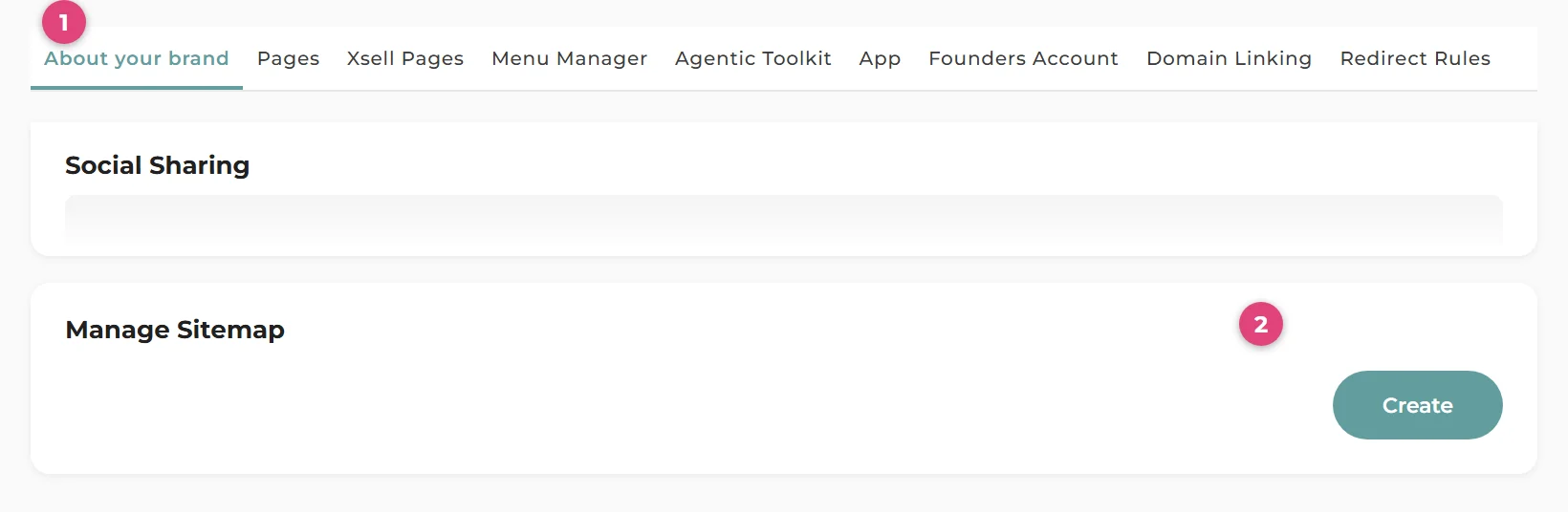
Create is the one-time setup that puts your XML sitemap in place. You only ever do this once per brand, and it is worth doing early: it is one of the launch basics, alongside linking your domain.
After that, it updates itself
You do not need to regenerate your sitemap when you add, edit, move or delete pages. Whenever a page on your brand is rebuilt, the platform refreshes your XML sitemap shortly afterwards (changes are batched, so a burst of edits produces one refresh, usually within a minute or two). Each entry carries the page's real last-updated date, so search engines can see exactly what changed and when.
The XML sitemap lists your live pages that allow indexing. Deleted pages, folders that only group other pages, and any page where you have switched indexing off are left out automatically.
The Manage Sitemap buttons
Once your sitemap exists, the card shows four buttons:

- Regenerate XML Sitemap (1): rebuilds the XML sitemap right now. You rarely need it given the automatic updates; it is there for when you want to be certain, for example just before submitting your site in a search console.
- Clean Stale HTML (2): sweeps out old copies of pages that no longer exist on your site, so a deleted page stops being served. See the Cleaning Up Stale Pages guide for when to reach for this.
- View (3): opens your live
/sitemap.xmlin a new tab. - Copy XML Sitemap URL (4): copies the sitemap address to your clipboard, ready to paste into Google Search Console or Bing Webmaster Tools.
Checking your sitemap is fresh
Press View (or open yourdomain.com/sitemap.xml) and look at the top of the file:
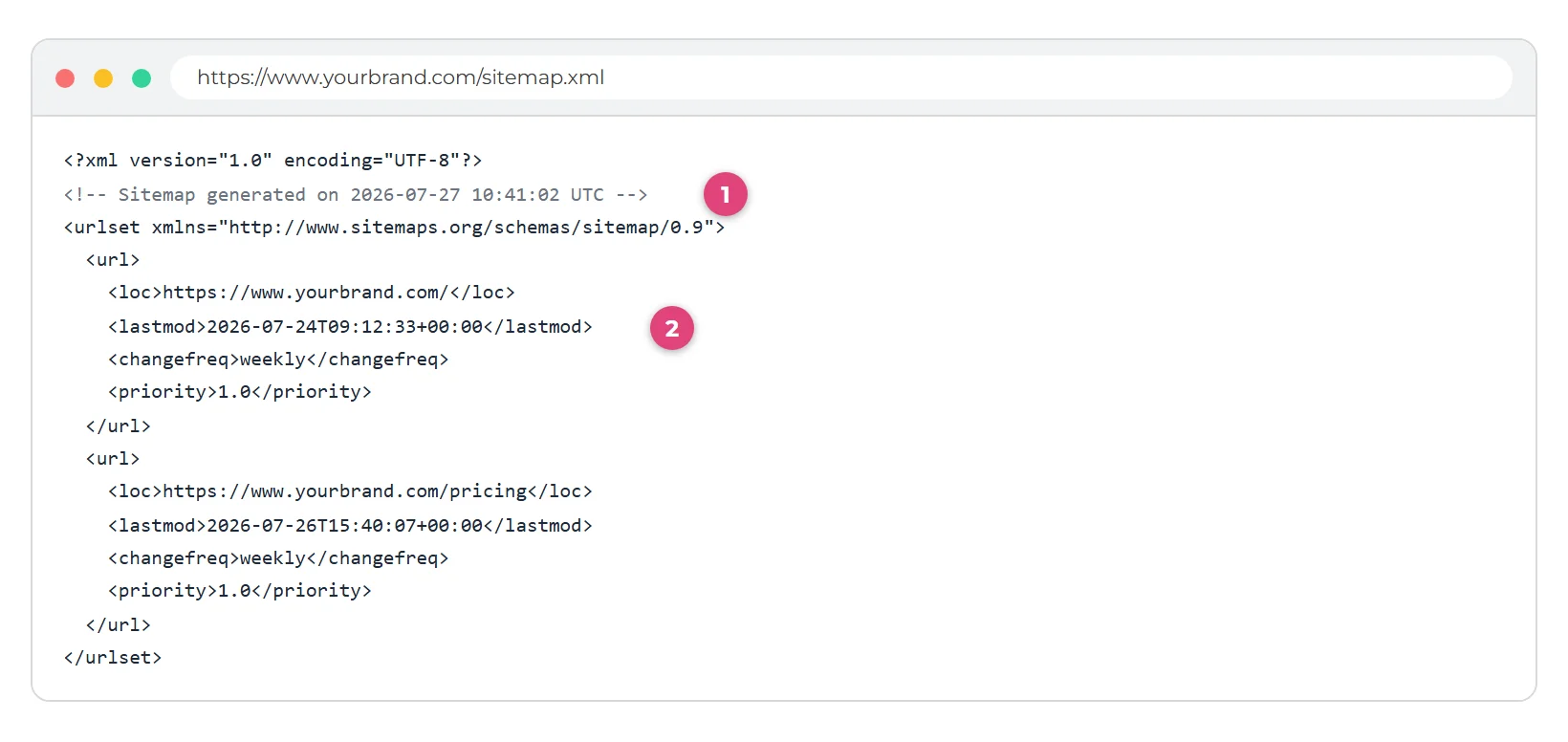
- The generated on line (1) tells you when the whole file was last produced. If you have just made changes, give it a minute or two and refresh.
- Each page's lastmod date (2) is the real date that page last changed, which is what search engines use to decide what to re-crawl.
robots.txt already advertises the sitemap. But adding it in Google Search Console or Bing Webmaster Tools gets you useful reporting on how your pages are indexed: use Copy XML Sitemap URL and paste it into the console's sitemap section.Good to know
- Indexing switches matter. A page with indexing turned off is excluded from the XML sitemap as well as carrying a noindex tag, so switching indexing off really does take it out of search engines' view of your site. The indexing switch guide covers exactly what it does.
- Multiple domains are handled. The sitemap is produced for each address your brand serves on, and every entry uses that address, so the URLs are always consistent with the domain the crawler is on.
- Before your domain is linked the sitemap exists on your temporary address too, so you can check everything is in order pre-launch.